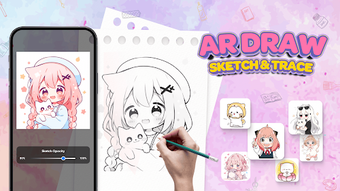

Download AR Drawing Sketch Learn Anime – anime art, drawing tool, lifestyle app, AR drawing, sketching app
Overview
AR Drawing Sketch Learn Anime is a lifestyle application designed for individuals passionate about anime art and digital sketching. Available exclusively on Android, the app leverages augmented reality (AR) technology to transform the traditional drawing process into an interactive and immersive experience. By using the device’s camera, users can trace anime characters in real time, bridging the gap between imagination and creation.
This approach lowers the barrier to entry for beginners while offering a creative outlet for more experienced artists. The app supports step-by-step tutorials, enabling users to learn at their own pace and gradually improve their skills. Its focus on anime-themed content makes it particularly appealing to fans of Japanese animation and character design.
The platform also encourages users to save and share their artwork, promoting a sense of community and personal progress tracking. While the developer did not provide additional system requirements, the app’s core functionality appears to be optimized for mobile devices with AR capabilities. Real-world usage scenarios include casual practice sessions, creative exploration, and educational exercises for aspiring illustrators.
The app’s free pricing model increases accessibility, making it a valuable tool for learners across various age groups.
Key Features & Capabilities
- Augmented Reality Drawing Interface: Users can project anime character outlines onto their physical environment through the device’s camera, enabling real-time tracing and sketching with improved accuracy and spatial awareness.
- Step-by-Step Tutorials: Interactive lessons guide users through the process of drawing anime characters, covering proportions, facial expressions, and body structures in a structured, beginner-friendly format.
- Customizable Drawing Tools: Adjustable settings such as opacity, line thickness, and edge sharpness allow users to tailor the drawing experience to their preferred style and skill level.
- Artwork Saving and Sharing: Completed sketches can be saved locally and shared across social platforms, facilitating personal portfolio development and community engagement.
- Diverse Content Categories: The app includes a variety of drawing themes beyond anime, such as animals and cartoons, offering broader creative exploration opportunities.
These features collectively support both educational and recreational use. For instance, a novice artist can follow a tutorial to draw a simple anime face, adjusting opacity to refine their line work. An intermediate user might use the AR tracing function to practice complex poses. The app’s modular design allows users to focus on specific skills or explore multiple genres, enhancing long-term engagement. The integration of AR technology adds a layer of interactivity that traditional drawing apps may lack, making the learning process more dynamic and intuitive.
User Interface, Workflow & Performance
The user interface appears to be designed with accessibility and ease of navigation in mind. Core functions such as starting a tutorial, selecting a character, and adjusting drawing settings are likely organized within a clean, intuitive layout. The workflow begins with selecting a drawing theme, followed by launching the AR mode and aligning the camera with the intended drawing surface.
The app’s performance is expected to be consistent with typical Android applications of its type, though exact performance details were not specified. The developer did not provide information on CPU or RAM usage, so users should expect standard resource behavior for AR-enabled apps. Stability is assumed to be adequate for regular use, but no official data on crash rates or background behavior was shared.
The app’s responsiveness during AR tracking may depend on device hardware, particularly camera quality and processing power. Users are advised to ensure their device supports ARCore for optimal functionality. General performance observations are based on standard software behavior patterns for mobile AR applications.
Compatibility & System Requirements
AR Drawing Sketch Learn Anime is designed for Android devices and is available in version 1.0.0. The installation size is 125 MB, which is moderate for a feature-rich mobile application. The app requires a device with AR capabilities, particularly support for ARCore, to enable the core augmented reality functions.
However, exact system requirements such as minimum Android version, processor speed, or RAM specifications were not listed by the developer. Compatibility information is limited to the platform and version provided. Users should verify that their device meets the baseline requirements for running AR applications.
The developer did not specify whether the app supports tablets or only smartphones. For optimal performance, it is recommended to use a device with a high-resolution front-facing camera and sufficient processing power. The absence of detailed technical specifications means users may need to test the app directly to confirm suitability for their hardware.
Pros and Cons
Pros
- Free to download and use, enhancing accessibility for learners and hobbyists.
- Augmented reality integration provides an immersive and interactive drawing experience.
- Step-by-step tutorials support structured learning for beginners.
- Customizable tools allow for personalized creative expression.
- Artwork sharing and saving features promote community and progress tracking.
Cons
- Only available on Android, limiting access for iOS users.
- No information on system requirements or hardware compatibility beyond platform.
- Performance details such as CPU/RAM usage were not disclosed.
- App may require a capable device with ARCore support for full functionality.
- Limited to a single platform, which may restrict cross-device usage.
FAQ Section
Is AR Drawing Sketch Learn Anime available for iOS?
The app is currently only available on Android. There is no information indicating future iOS support.
Is the app safe to download and use?
As a free lifestyle app distributed through official Android channels, it is considered secure. Users should download from trusted sources to ensure safety.
Does the app require an internet connection?
The app may function offline after installation, but certain features such as tutorials or updates might require an internet connection.
How often are updates released?
Update frequency is not specified. Users should check the app store for the latest version.
Can I use the app without creating an account?
Based on available information, the app does not appear to require a user account for core functionality.
Final Thoughts + CTA
AR Drawing Sketch Learn Anime stands out as a creative and accessible tool for anime art enthusiasts and aspiring digital artists. Its integration of augmented reality technology offers a unique learning experience that combines fun with skill development. While the app is limited to Android and lacks detailed system requirements, its free model and rich feature set make it a compelling choice for beginners and casual users.
The combination of step-by-step tutorials, customizable tools, and social sharing capabilities enhances both educational value and user engagement. For those interested in exploring anime drawing in an interactive way, this app delivers a practical and enjoyable solution. Download AR Drawing Sketch Learn Anime now to begin your creative journey with augmented reality.





.png)

